Seamless Data Migration Between Oracle and Microsoft SQL Server Using Oracle GoldenGate (On-Premises and OCI)
Jun 10, 2025
3 min read
Updated: Jan 29
In today’s multi-database enterprise environments, data migration between heterogeneous systems like Oracle and Microsoft SQL Server (MSSQL) is a common requirement. Whether for modernization, consolidation, or cloud adoption, achieving minimal downtime and real-time replication is crucial. Oracle GoldenGate stands out as a powerful, real-time data replication and migration tool supporting heterogeneous databases and architectures, including on-premises and Oracle Cloud Infrastructure (OCI).
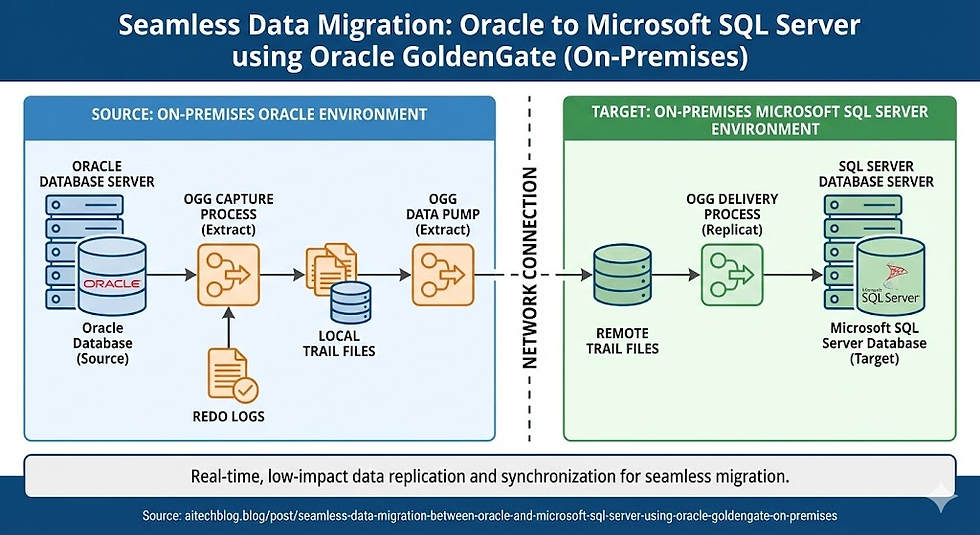
This blog walks you through how to use Oracle GoldenGate to migrate data between Oracle Database and MSSQL, both on-premises and on OCI, with best practices, architecture overview, and implementation steps.
Why Use Oracle GoldenGate for Oracle to MSSQL Migration?
Oracle GoldenGate offers:
Real-time, low-latency replication
Minimal impact on source systems
Support for heterogeneous databases
Scalable, high-performance architecture
Built-in fault tolerance and checkpointing
It enables businesses to keep applications online during the migration process, minimizing downtime and data loss.
Architecture Overview
Oracle GoldenGate's architecture for Oracle-to-MSSQL replication includes:
Extract Process: Captures committed changes from Oracle redo/archived logs.
Trail Files: Intermediate files storing changes in a platform-independent format.
Data Pump (optional): Transmits trail files to remote GoldenGate instances.
Replicat Process: Applies data changes to the target MSSQL database.
When deployed on OCI, GoldenGate can leverage Oracle GoldenGate Cloud Service, offering a fully managed platform with elastic scalability, built-in monitoring, and OCI-native integration.
Deployment Scenarios
On-Prem to On-Prem
On-Prem to OCI
OCI to On-Prem
OCI to OCI (Cloud-to-Cloud)
Each scenario follows similar principles but differs in network configuration and provisioning.
Step-by-Step Migration Process
1. Prerequisites
Oracle Database (source) with archive logging enabled
MSSQL Server (target) configured and reachable
GoldenGate software installed on both ends
Network connectivity between source and target
Required ports open (default: 7809, etc.)
User accounts with appropriate privileges
2. Configure Oracle Extract
ADD EXTRACT extora, TRANLOG, BEGIN NOW
ADD EXTTRAIL ./dirdat/oe, EXTRACT extora
TABLE HR.EMPLOYEES;
Extracts changes from redo logs
Creates trail files for data transfer
3. Configure MSSQL Replicat
ADD REPLICAT repmss, TARGETDB mssqldb, USERID sqluser, PASSWORD sqlpass MAP HR.EMPLOYEES, TARGET dbo.EMPLOYEES;
Maps source Oracle tables to target MSSQL tables
Ensures format conversion as needed
4. Initial Load
You can use Oracle Data Pump or GoldenGate Initial Load Utility for bulk data:
GGSCI> ADD EXTRACT initload, SOURCEISTABLE
Or use Oracle Data Pump export/import for one-time load before starting GoldenGate replication.
5. Configure Data Pump (Optional)
ADD EXTRACT pumpora, EXTTRAIL ./dirdat/pe ADD RMTTRAIL ./dirdat/pe, EXTRACT pumpora
Improves performance and separation of duties
Useful for WAN-based (on-prem to OCI) replication
GoldenGate on Oracle Cloud Infrastructure (OCI)
GoldenGate Cloud Service simplifies deployment:
Fully managed, with high availability
Integrated with OCI monitoring, logging, and IAM
Supports heterogeneous replication
Steps include:
Provision GoldenGate deployment from OCI Console
Configure source/target connections (Oracle and MSSQL)
Define Extract, Replicat, and Mappings using UI or Admin CLI
Security & Best Practices
Use SSL/TLS for network connections
Follow least privilege principle for database users
Regularly monitor lag and latency
Implement error handling and retry logic
Challenges and Considerations
Schema differences between Oracle and MSSQL
Data type conversion (e.g., DATE vs. DATETIME)
Constraint handling and replication order
Character set compatibility


Comments